
Financial Charting Component for .NET
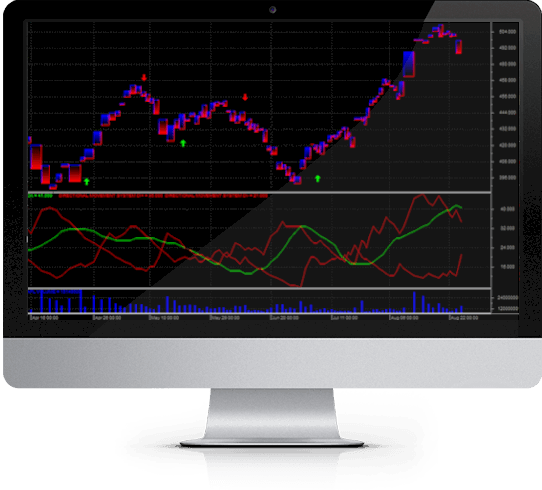
StockChartX WPF (Windows Presentation Foundation) is our financial charting solution for Microsoft WPF, based on our original StockChartX stock chart library.
StockChartX WPF was developed to take advantage of the WPF framework, offering several new charting features, including heat maps, gradient painting, anti-aliased lines, animations, and more.
Just like our COM-based financial chart, StockChartX WPF supports 3D Candlesticks, Renko, Kagi, Three Line Break, Point & Figure, Candlevolume, Equivolume, Shaded Equivolume, Heikin Ashi Candlesticks, Darvas Boxes, and the most popular Technical Analysis formulas.
What's New
StockChartX WPF supports all popular features of the original StockChartX, plus:
1. A brand new codebase, developed in C#.2. A new feature displaying heat-maps of technical indicators.
3. Maximize, minimize, and restore buttons for chart panels.
4. Horizontal volume bars.
5. Dragable x and y scale.
6. Screen animations, gradients, and anti-aliased drawings.
7. Theme support.
Features
We asked more than 1,200 traders which charting features and technical indicators they wanted in StockChartX. There were lots of valuable feature requests, and we added them all.
StockChartX features real-time, tick-by-tick charting with High-Low-Close bars, Open-High-Low-Close bars, 2D & 3D Candlestick charts, Renko, Kagi, Three Line Break, Point & Figure, Candle-Volume, Equi-Volume, Shaded Equi-Volume, Heikin Ashi Candlesticks, Darvas Boxes and other price styles.
You can chart real-time market data; insert buy, sell, or exit symbols; insert text, trend lines, custom images, multiple indicators, and overlay indicators (share scales); display charts with semi-log or linear scaling; print charts; save charts as images; save/load charts as binary files and more.
You can also add additional functionalities programmatically using the provided examples with C# source code.
Technical Indicators
StockChartX also features over 80 popular technical indicators which can be customized with user-defined parameters. Our technical indicators have been validated by their authors whenever possible, so you can be sure the calculations are correct. That's why our technical indicator library has won numerous awards by Futures magazine and Stocks & Commodities magazine.
Ongoing Development
We recently added Elder Ray, Keltner Channel, Coppock Curve, Twiggs Money Flow and other popular indicators, and the latest version of StockChartX has better graphics and is over 37% faster than previous versions thanks to are new bitmap double buffering support for WPF.
Why StockChartX?
When we originally developed StockChartX, we could not find a financial charting component robust enough to meet the requirements of our clients. It seemed that all stock chart libraries out there were developed by... well, charting component companies.
The reality is that charting component companies seem to know very little, if anything, about finance. Their financial charting libraries are normally bundled with other standard charting components: doughnut charts, pie charts, fancy 3D surface charts and reporting engines.
The majority of charting products out there produce financial charts which are inadequate because their financial charting interfaces were designed as an afterthought.
So we decided to build our own financial charting component to meet our clients' needs. Today, StockChartX is the preferred stock charting component of developers and traders around the world.
M4 WPF Trading Platform
If you're looking for a complete trading application framework based on StockChartX WPF, have a look at the WPF edition of our M4 Trading Platform.
Modulus Source Code License
The Modulus Source Code License includes approximately three million lines of source code, documentation, and example projects, with a perpetual license, including source code updates, for the following products: TA-SDK C++, C#, Java, JS, VB, TradeScript C++ and C#, StockChartX C++, C#, JS, Java, Obj C, Neural Trader C++, Evo2 C#, PatternLogic C#, MyExchange C#, SuperWebSocket Data Server C#, RMD Server C++, M4 WinForm C#, M4 WPF C#, M4 Forex HTML5, M4 Standard HTML5, M4 iOS Obj C, M4 Mac Obj C, M4 Android Java and more. Most products are provided with complete source code. Support and consulting services available separately.
Schedule Demo
StockChartX Professional Edition Features
- StockChartX supports all of the popular stock chart display styles: Candlestick, OHLCV, OHLC, and HLC,Heiken Ashi Candles, Darvas Boxes, 3D Candlesticks, Renko, Kagi, Three Line Break, Point & Figure, Candlevolume,
- New, smooth anti-aliased painting for all technical indicators and line studies.
- Real-time automatic technical analysis updating.
- Support for built-in Line Studies such as Ellipse, Rectangle, Trend Line, Speed Lines, Gann Fan, Fibonacci Arcs, Fibonacci Fan, Fibonacci Retracements, Fibonacci Time Zones, Tirone Levels, Quadrant Lines, Raff Regression, and Error Channels.
- New Trend Line Penetration events notify your application whenever a series crosses above or below a trend line. Trend lines can automatically extend into the future.
- StockChartX uses double buffering - this means you will see absolutely no screen flickering.
- An unlimited number of series can be displayed in just one chart.
- Data can be imported into StockChartX from any database, text file format, or real-time feed.
- Full support for Gregorian/Julian date conversions.
- Windowing system allows users to resize, change positions up or down, maximize, minimize, restore, and close chart windows.
- Chart windows are fully customizable programmatically. Change height, colors, styles and more from within your code.
- StockChartX manipulates screen graphics quickly and efficiently without a 3rd party graphics engine.
- Zoom-in, Zoom-out, scroll-left, and scroll-right programmatically or via the keyboard or mouse wheel.
- Supports trend line drawing, objects (buy/sell arrows, text, etc.) and more.
- Export chart images to file (can be displayed on the web) or send to a printer.
- Users can save/load charts, restoring data, indicators, colors, drawings, period objects and more.
- The library comes with C# WPF examples, enabling you to modify appearances, add new types of indicators, and other features. Customize your financial charts the way you need them.
Programmer F.A.Q.s
- Q. How do I insert data into StockChartX? Is it difficult? A. StockChartX uses a function called AppendValue (series name, date, value). You actually "push" data into StockChartX, so it does not matter where the data comes from, be it a database, text file, XML file, or real time tick-by-tick data – the data goes into StockChartX the same way, quick and simple.
- Q. What do I have to do to add an indicator to StockChartX? A. Just call AddIndicatorSeries (Indicator Type, Key, UserParams). If UserParams is TRUE, the indicator dialog box will appear and the user will be allowed to edit the indicator parameters. If UserParams is FALSE, you will be able to set the parameters programmatically in your code.
- Q. How many panels (price series or indicators) can I have open at once and tiled on top of each other? A. Unlike all other stock chart libraries out there, you are not limited in this department. You can have several indicators and price series on the chart at once. You are only limited by your screen's real estate.
- Q. Can I select symbols, text objects, and series with my mouse and move them? A. Of course. Unlike any other financial chart library out there, StockChartX allows you to grab any series or object, move it around with your mouse, resize it, drag it to another panel, scroll the chart using the mouse wheel, resize panels with the mouse, overlay series, and much more.
- Q. Can I retrieve technical indicator values from StockChartX like I can with TA-SDK? And without showing the technical indicators on the chart? A. Yes, you can calculate technical indicators and retrieve the values without ever displaying the indicator.
- Q. Can I add my own custom series (such as my own indicators) to the chart? A. Yes, StockChartX is designed to allow you to add any type of series to the chart. You can display your series in one of many series styles (bar, line, oscillator, etc.).
- Q. Can I change an individual bar's color? A. Yes.
- Q. What is the file size of StockChartX and does it require any run time files? A. StockChartX is around 2MB and compiled in .NET.
- Q. Does StockChartX work on older operating systems such as Windows XP? A. Yes, StockChartX runs on all Windows operating systems that are newer than Windows 3.1, and it is designed to take advantage of newer operating system graphic APIs when available. It works even better on Windows 8 and above.
- Q. Does this version of StockChartX work for WinForms? A. We recommend the C++ version for WinForms.
- Q. Do you offer customization services for StockChartX? A. Yes. Please contact us for details.
- Q. My question wasn't answered here, now what? A. Give us a call! We'd be happy to speak with you: (888) 318-3754. You can also contact us here
